Kairomi Pro for WordPress

More groomers. More locations. Same Kairomi.

Kairomi Pro is the paid edition of Kairomi, the booking plugin for pet groomers. It is made for salons where several people work, or that run more than one shop. It adds groomers and locations with their own hours and absences, a login for the people who work with you, the takings page, import from Amelia and direct support.
  • 30-day trial the first time
  • VAT and invoices handled by Stripe
  • From €59 a year + VAT
yoursite.com/wp-admin › Kairomi › Prenotazioni
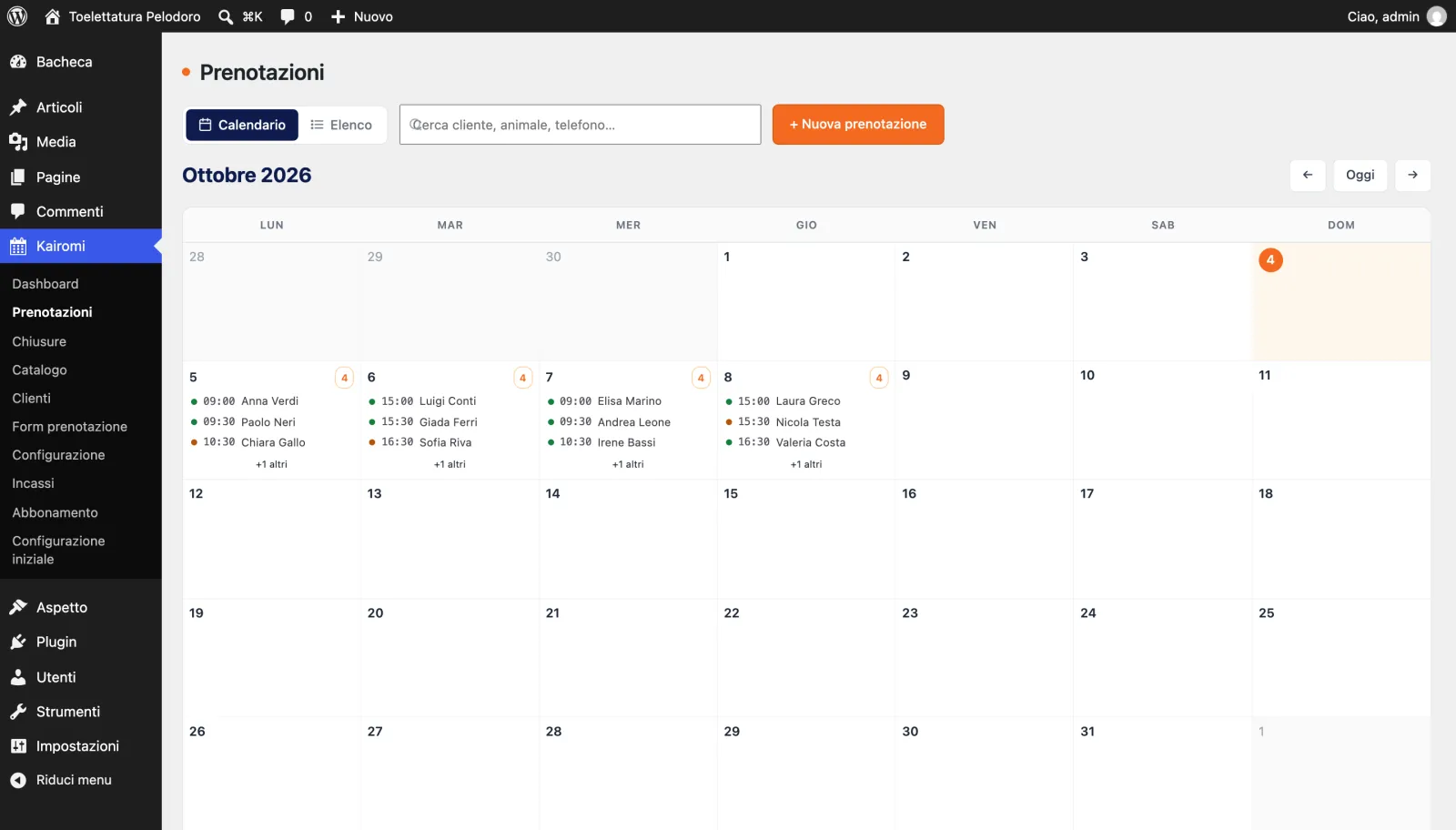
The Kairomi Pro calendar in the WordPress admin, in Italian: October 2026 with four bookings a day from Monday 5 to Thursday 8 and, in the Kairomi menu, the Incassi (takings) and Abbonamento (subscription) items.
Real screen, sample data
What it adds

What changeswhen the salon grows.

You already know the rest: prices by animal and weight, calendar, booking form, emails and reminders. Kairomi Pro keeps all of it and adds the six things below.

Every groomer with their own diary

Each groomer has a colour in the calendar, their own weekly hours and the number of animals they handle at once. If someone is out for an hour or an afternoon, you block only their slot: the others stay bookable.

Every location with its own hours

Morning and afternoon, closing days and holidays for each location. In the booking form the customer picks the location and only sees the free times there.

A login for the people who work with you

Link a groomer to their WordPress user. They see the calendar and the customers of the locations you choose, not the price list or the settings. If you want, they can manage locations and hours too.

Sara, Groomer role
Calendar and bookingsyes
Customers and petsyes
Price list and settingsno

Takings: the month's total

Record each payment against its booking: cash, card, bank transfer or voucher. The month's total sits at the top, the history below. Kairomi does not take the money for you. It keeps the count.

From Amelia, without starting over

If Amelia is installed on the same site, Kairomi Pro reads its services, extras, locations, employees, customers, appointments and payments. First a dry run that only counts what would come in, then the real import. Run it again and it creates no duplicates.

Direct support

For a setup question or a problem with the plugin, write to info@mokita.studio. Include the address of the site where you use Kairomi: it speeds things up.

Comparison

Free or Pro,line by line.

For a shop that takes one appointment at a time, the free version is enough, and it never expires. Pro is for when several people work in the shop, or when there is more than one shop.

What you get in the free version of Kairomi and in Kairomi Pro
FeatureKairomi freeKairomi Pro
BookingsUnlimitedUnlimited
Prices by animal and weight, calendar, booking form, emails and remindersYesYes
Closures, Italian public holidays, import from CSV and JSON filesYesYes
LocationsOneSeveral, each with its own hours
Appointments at the same timeOneAs many as the free groomers
Groomers with their own hours and absencesNoYes
Staff loginsNoYes
Takings pageNoYes
Import from AmeliaNoYes
Direct support by emailNoYes
PriceFreeFrom €59 a year + VAT
Pricing

Pay per site,not per groomer.

Every licence has every Pro feature. Only the number of WordPress sites changes: groomers, locations and bookings have no limits. Prices exclude VAT; VAT and invoices are handled by Stripe.

1Choose the licence
€59a year + VAT

About €4.92 a month, paid once a year.

Payment for the 1-site licence
  • Every Kairomi Pro feature
  • 1 WordPress site
  • Updates and support included
€99a year + VAT

About €33 per site. Yearly payment only.

  • Every Kairomi Pro feature
  • Up to 3 WordPress sites
  • Updates and support included

2Your details

Your licence key and the link to download the plugin arrive here.

The WordPress site where you use Kairomi. The domain is enough, for example yoursalon.com.

Kairomi Pro – 1 siteFirst time: 30-day free trial, then €59 + VAT a year.

Payment continues on Stripe's secure page, where you see the total before confirming. The 30-day trial applies to your first subscription: if you have had one before, Stripe charges the first period straight away. Read the terms of sale (opens in a new tab), the refund policy (opens in a new tab) and the privacy notice (opens in a new tab).

After payment

From paymentto the first appointment.

  1. Choose and pay

    Licence, email and site address above, then your card on Stripe's page. The first time you get a 30-day trial: nothing to pay today.

  2. Download Kairomi Pro

    At the end you find the licence key and the button to download the plugin. Both also arrive by email.

  3. Install it

    In WordPress open Plugins › Add New Plugin › Upload Plugin, choose the file, press “Install Now”, then “Activate”. If you use the free version, deactivate it before you activate Pro: the two do not run together, and WordPress tells you so.

  4. Activate the licence

    In Kairomi › Abbonamento paste the key and press “Attiva”. Then add groomers and locations under Kairomi › Configurazione, in the Toelettatori and Sedi tabs.

FAQ

Beforeyou choose.

Write to info@mokita.studio
Is the plugin in English?
The admin screens and the booking form are in Italian. The plugin is ready for translation, but no translations are available yet.
I already use the free version. Do I lose my data?
No. Install Kairomi Pro, deactivate the free Kairomi and activate Pro: bookings, customers and settings move across by themselves, and the shop becomes the first location and the first groomer. The two versions do not run together: if you activate both, WordPress warns you. After the switch you can delete the free version: your data stays, because Pro now uses it. Delete it only after Pro is active.
What happens when the trial ends?
Stripe charges the first year, or the first month, to the card you entered. Cancel during the trial and you pay nothing. To cancel, press “Gestisci abbonamento” (manage subscription) under Kairomi › Abbonamento: you get an email with a link, valid for 15 minutes, to the page where you change the card, download invoices or cancel. Cancelling takes effect at the end of the period already paid.
What if I stop paying?
Kairomi Pro stays on your site with all your data. Without an active licence it accepts up to 20 new bookings a month, adds no groomers or locations beyond those you have, and closes the takings page. The admin shows an “Abbonamento scaduto” (subscription expired) notice with a button to renew: renew and everything works as before. The free version is made for a single shop and has no monthly cap; Pro without an active subscription goes back to the free limits of Pro.
I have several shops and one site. Which licence do I need?
The 1-site licence. It counts WordPress sites, not locations or groomers.
Can I move the licence to another site?
Yes. On the old site's Abbonamento page press “Libera questo sito” (release this site), then activate the key on the new one.
How do VAT and invoices work?
Prices exclude VAT. Link, a Stripe company, works out the VAT from the country and the VAT number you enter on the payment page and sends you a receipt or an invoice. On your bank statement the charge shows as LINK.COM followed by the product name.
Can I get a refund?
The cases and timing are in the refund policy. For a question before you pay, write to info@mokita.studio.

Try Proin your salon.

You have thirty days to set up groomers, locations and hours and work with real bookings. If you have a question before you start, write to info@mokita.studio.